
Build Better Pruning Policies in Less Time

Spotlight Image 13

Smarter Pruning Policies, Starting Now

We deployed a couple of updates to Pruning Policies that make the whole experience a lot smoother. Here’s what changed.

What's this policy for, again?

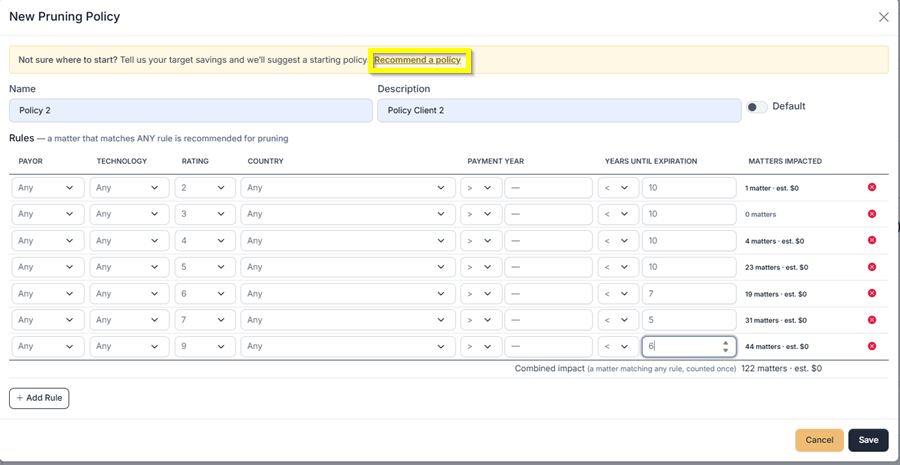
Small addition, but a useful one. There’s now a Description field on the policy setup screen. Use it to jot down what the policy is doing and why, especially handy when you’ve got several policies with similar names and need to tell them apart later. It also makes handoffs a lot easier when someone else needs to understand the logic you set up.

Not sure where to start? Let the tool suggest one.

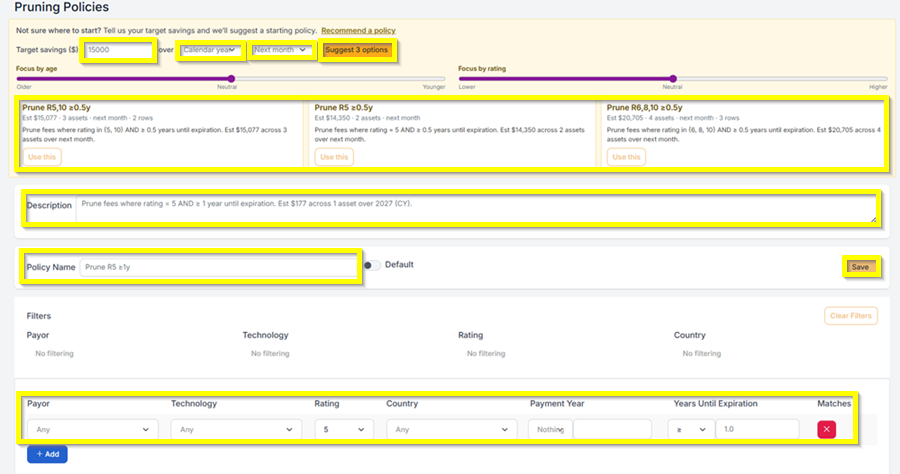
This is the bigger update. At the top of the Pruning Policies screen, there’s now a recommendation bar. You enter a target savings amount, pick whether you’re measuring over a calendar year or a fiscal year, and choose when to start, next month, next quarter, or next year. Click on Suggest 3 Options, and the system pulls three policy suggestions from your actual portfolio data, each one calibrated to hit your target differently.
Reco
Reco 2

Have feedback or enhancement ideas? Email us at support@prokurio.com

Like this kind of stuff?

We release product updates every weekend!

Check out all our 2026 updates here: 2026 Updates

Want to learn more about our IP budget planning tools?

Learn more here: IP budgeting tools

More To Explore

Full logo

We've Got a Lot To Share!

Sign up for quick IP-focused updates every once in a while. 
small c popup

Let's Do It!

Give us your email if you’d like to try out IP Forecaster. We’ll shoot you a confirmation email and get you set up quickly – check your SPAM folder if you don’t see an email within 10 minutes.

There’s no cost or long-term obligation.
small c popup

Let's Do It!

Give us your email if you’d like to try out our Firm Planning Bundle. We’ll send you a confirmation email and get your trial started. If you don’t see an email within 10 minutes, check your spam folder.

There’s no cost or long-term obligation.
small c popup

Let's Do It!

Give us your email if you’d like to try out Client Planner. We’ll shoot you a confirmation email and get your trial started – check your SPAM folder if you don’t see an email within 10 minutes.

There’s no cost or long-term obligation.
Full logo

We need a little info...

Give us some contact info and we’ll email you the program details. No SPAM, no hassles. 
Full logo

You're All Set!

You should receive a confirmation shortly.
Check your SPAM folder if you don’t see an email.
small c popup

Let's Do It!

Give us your email if you’d like to try out IP Forecaster. We’ll shoot you a confirmation email and get you setup quickly – check your SPAM folder if you don’t see an email within 10 minutes.

There’s no cost or long-term obligation.