

Translated documents are often longer than the source. Some foreign associates charge based on the resulting word count. Now Prokurio can account for that automatically.
About the Feature
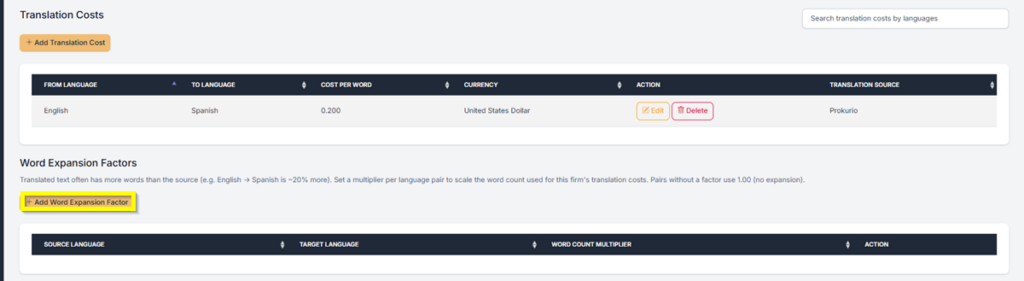
Word Expansion Factors let you set a multiplier per language pair for a specific foreign firm. When Prokurio calculates translation costs, it applies that multiplier to the source word count before running the numbers. Language pairs without a factor set use 1.00 by default, meaning no expansion.
How to Set It Up?
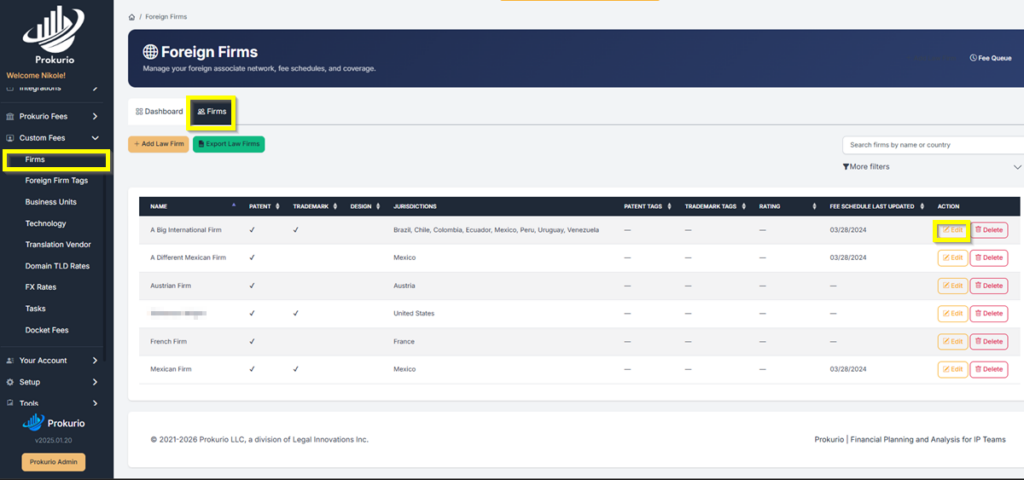
From your Homepage, go to Custom Fees in the left sidebar, then select Firms. On the Firms tab, find the firm you want to configure and click Edit.
On the firm’s maintenance screen, scroll down to the Word Expansion Factors section and click + Add Word Expansion Factor.
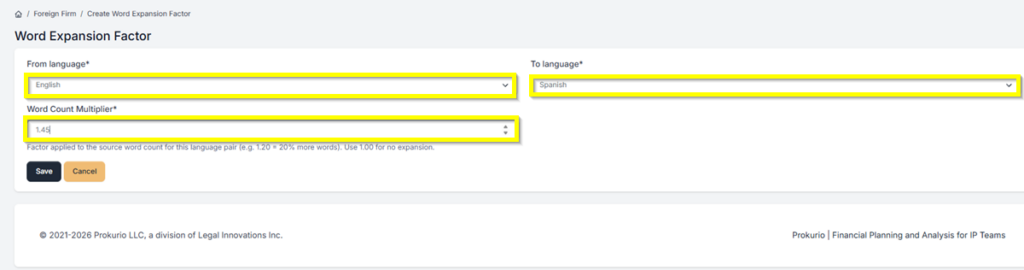
On the Word Expansion Factor screen, set your From language and To language using the dropdowns. Then enter your Word Count Multiplier. For example, a value of 1.20 means 20% more words. Use 1.00 for no expansion. Click Save when done.
Impact on Your Forecast
Once saved, Prokurio applies the multiplier whenever it calculates translation costs for that firm and language pair. The result is a more accurate translation cost estimate that reflects what your associate will actually charge.
Have feedback or enhancement ideas? Email us at support@prokurio.com
Like this kind of stuff?
We release product updates every weekend!
Check out all our 2026 updates here: 2026 Updates
Want to learn more about our IP budget planning tools?
Learn more here: IP budgeting tools