
Prokurio updates exchange rates every day. But if your organization needs rates pulled on a specific schedule, you can now set that up directly in the platform.
The feature at a glance
The FX Rate Schedule lets you define exactly when Prokurio pulls live exchange rates and locks them in for the day. Your forecasts use those rates, and your existing scheduled rates are only replaced when a download succeeds. Manually entered rates are never overwritten.
Setting up your schedule
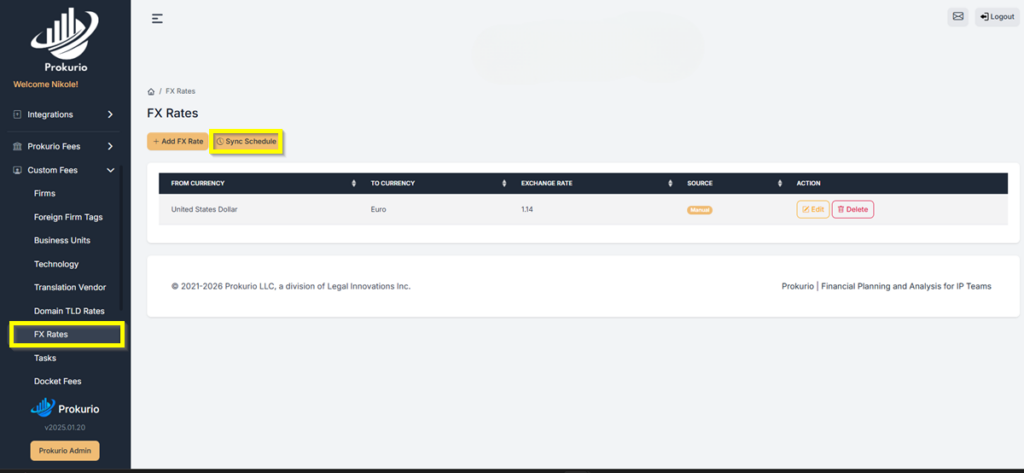
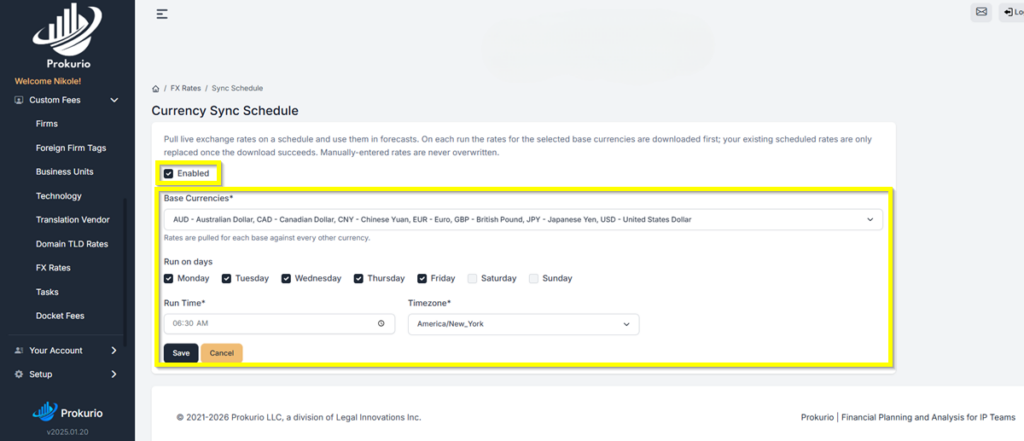
From your Homepage, go to Custom Fees in the left sidebar, then select FX Rates and click Sync Schedule. On the Sync Schedule screen, check the Enabled box to activate it.
Under Base Currencies, select the currencies you want rates pulled for. Prokurio pulls each base rate against every other currency.
Under Run on days, check the days you want the sync to run. Set your Run Time and Timezone, then click Save.
How rates are applied?
Once the schedule runs, Prokurio uses those rates across your forecasts for the day. If a sync fails, your existing rates stay in place until the next successful download. Any rates you’ve entered manually are always kept as-is.
Have feedback or enhancement ideas? Email us at support@prokurio.com
Like this kind of stuff?
We release product updates every weekend!
Check out all our 2026 updates here: 2026 Updates
Want to learn more about our IP budget planning tools?
Learn more here: IP budgeting tools