
Configurable Pruning Policies Are Here
Large patent portfolios are expensive to maintain, and the fees only get steeper over time. But figuring out which patents to review? That’s the hard part. Prokurio’s Pruning policies make it easy. Let’s check it out!
What Are Pruning Policies?
A pruning policy is a set of rules you define that automatically identifies patents in your portfolio as candidates for review. Instead of manually sorting through thousands of records, you tell the system: “Flag patents that match these criteria.”
Here’s how it works in practice.
Most companies periodically rate their intellectual property, typically once a year or every other year, assigning each patent a value score. A pruning policy uses that rating, along with the patent’s remaining lifespan, to determine whether it should be flagged.
For example:
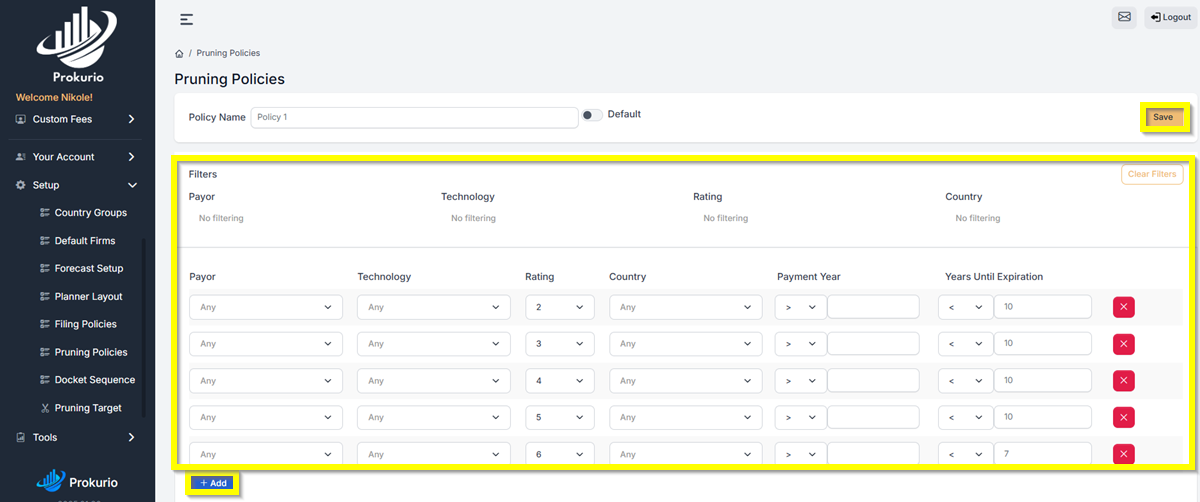
- Rating of 2 (low value) + less than 10 years until expiration → Flag for pruning
- Rating of 3, 4, or 5 (moderate value) + less than 10 years remaining → Flag for pruning
- Rating of 6 (higher value) + less than 7 years remaining → Flag for pruning
That last rule is worth unpacking. A rating of 6 suggests the patent still has meaningful value, so you set a tighter window. If it has fewer than seven years left, it’s already in its 14th year of life. Maintenance costs are at their peak, and the patent will expire naturally before long. That’s a conversation worth having.
The beauty of this approach is its flexibility. You can create multiple policies, an aggressive one, a conservative one, and everything in between, then compare their projected impact before committing to anything.
Let's set it up
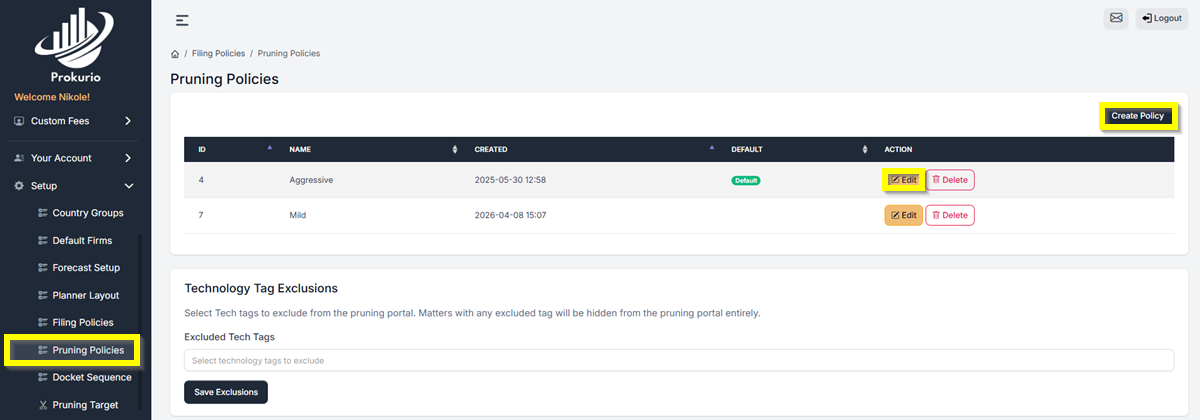
To get started, go to Setup > Pruning Policies and create or edit a policy. From there, set the value rating and maximum years until expiration for each rule. For example, you might flag anything rated 2 to 5 with less than 10 years remaining, and only flag higher rated patents (like a 6) if they have fewer than 7 years left, since they still hold value, you set a tighter window. Once you’re happy with your rules, click Save.
Have feedback or enhancement ideas? Email us at support@prokurio.com
Like this kind of stuff?
We release product updates every weekend!
Check out all our 2026 updates here: 2026 Updates
Want to learn more about our IP cost planning tools?
Learn more here: Prokurio Cost Estimation Tools
Want to learn more about our IP budget planning tools?
Learn more here: IP budgeting tools