This week, we’ve launched the first of several important updates to the Prokurio forecasting platform. Read on to learn more about the updates to the Homepage and what’s coming.
Why Are We Changing Things?
We’ve been watching how firms have been using our forecasting tools over the last couple of years and have identified several opportunities to make the platform more intuitive while also helping users create forecasts more quickly.

More Focus, Less Stupid Stuff
Our original forecasting screens are amazingly sophisticated, dynamically changing based on what you are doing. With one screen, you can forecast costs for Unitary patents, National Phase Entry, or a direct national filing. The downside to this approach is that users need to know which toggles to select and how to set up the screen. It also means we have to include things on the screen in anticipation that you might need them. Requiring entry of claims for a PCT application is a classic example of the tradeoffs of a generic screen.
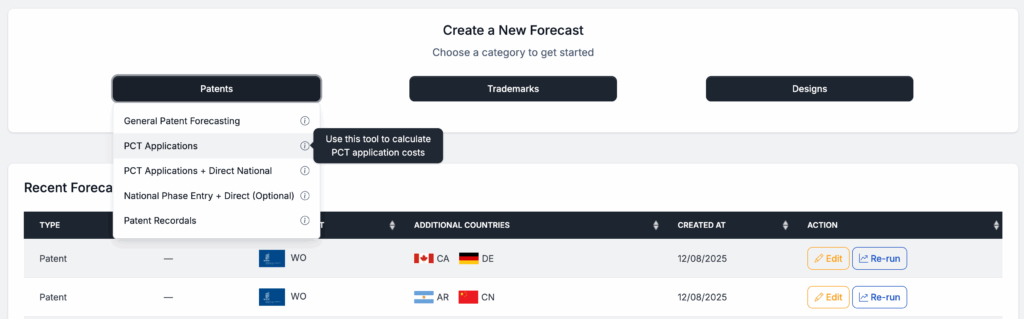
This week, we have started rolling out forecasting tools dedicated to specific forecast types. This allows us to align the forecast request screens with forecast requirements for the task at hand and to simplify and improve the user experience. It also means that you won’t have to wonder about what to put where to get the type of forecast you need.
Simpler PCT Application Forecasts
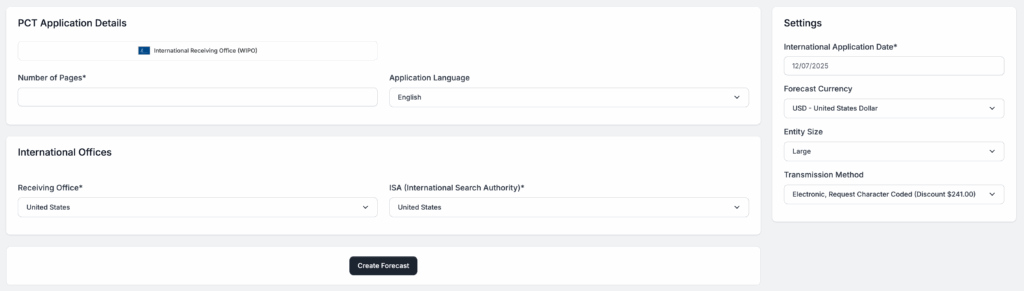
We’re kicking things off with two newly redesigned PCT application forecasting tools. One makes it easy to get a PCT application forecast, and the other makes it easy to combine a PCT application forecast with direct national forecasts.
Over the next few weeks, we’ll be rolling out several new and improved forecasting tools, including revamped EP Validation and Unitary forecasters and a completely redesigned national trademark forecasting system.
Want to Use the Screens You've Been Using the Last Two Years?
We know that change can be a hassle, so we aren’t touching the screens that you are familiar with. The “General Patent Forecasting” menu item is the same as the Patent Button that you were used to, and the National Phase Enter + Direct (Optional) menu item is the same as the National Phase button you were used to. There is no loss of functionality with this update, and all of the screens you have gotten used to are still available.
We appreciate all of the feedback we have received over the last couple of years and have tried to channel the lessons learned into these updates – let us know how we are doing!
Happy Forecasting,
Phil