

Here’s a simple feature with a big impact for this week’s highlight.
Needing to forecast filings from an application with a priority or application date that’s in the past?
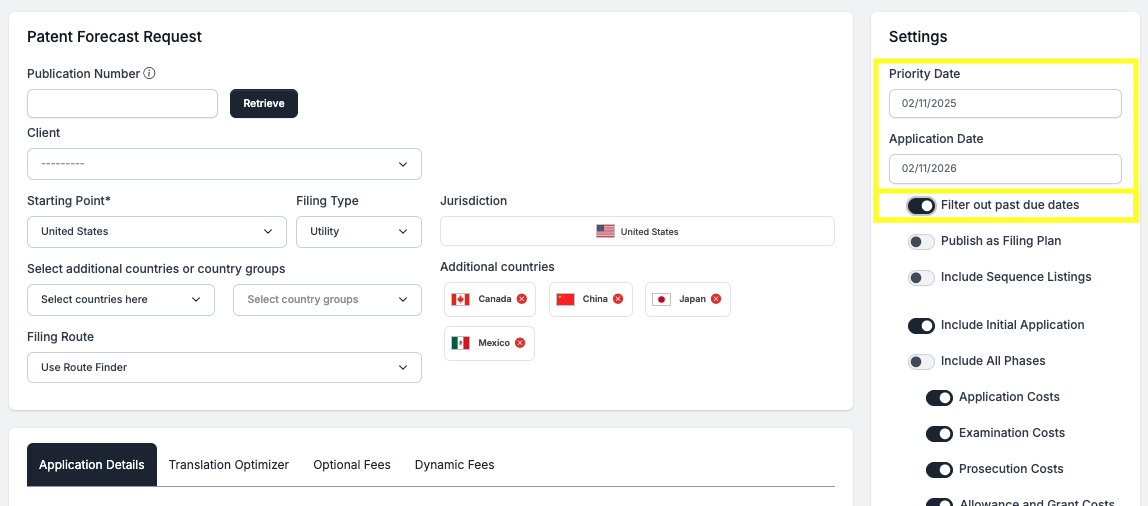
Now, when you enter either of these fields with a date in the past, a new toggle is displayed that allows you to filter out any past due dates and their fees from your forecast results.
Take a peek!
past due fee filter
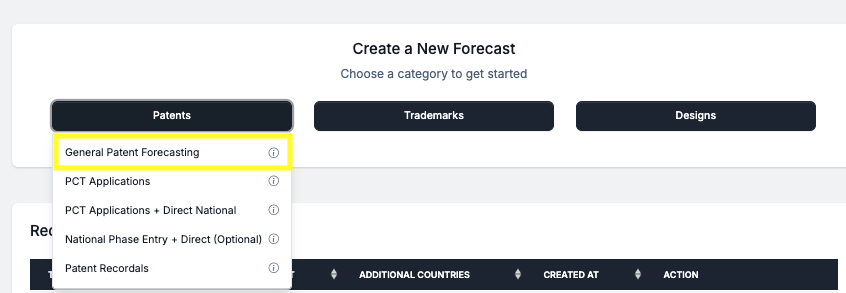
Click on the Patents button on the homepage, then click on General Patent Forecasting to launch the tool.
Your Priority and Application dates always default to the current date. Changing one or both of these dates to a date in the past, will trigger the new toggle labeled “Filter out past due dates”. If this toggle is turned on, then your forecast results will remove all tasks and their fees that would have calculated in the past.
Have feedback or enhancement ideas? Email us at support@prokurio.com
Like this kind of stuff?
We release product updates every weekend!
Check out all our 2025 updates here: 2025 Updates
Want to learn more about our IP cost planning tools?
Learn more here: Prokurio Cost Estimation Tools
Want to learn more about our IP budget planning tools?
Learn more here: IP budgeting tools