
Predicting prosecution costs has always been one of the hardest parts of IP forecasting. How much is left to do on a case? Is the patent office still reviewing it, or is it nearly granted? Without that context, your cost estimates are just educated guesses. Not anymore. Here’s what’s new.
What's Changed?
Client Planner now automatically downloads prosecution history data from patent offices around the world and uses it to improve the accuracy of your cost forecasts. The system connects to public PTO records, retrieves the full communication history for each matter, and uses that data to understand where each case stands in its life cycle.
This all happens behind the scenes. You don’t have to do anything manually. The data is retrieved, processed, and applied to your forecasts automatically.
From Guesswork to Accuracy
Every patent goes through a life cycle at the patent office. It gets filed, examined, possibly rejected, responded to, and eventually granted or abandoned. Where a case sits in that cycle has a massive impact on the remaining costs.
A patent at the very beginning of prosecution might still have $50,000 in costs ahead of it. One that’s nearly through the process might only have $1,000 left. Without knowing where each case stands, your forecasts are working with incomplete information.
By pulling in the actual prosecution history, Prokurio can now see the full record of communication between the patent office and the applicant. It knows when a case was rejected, when responses were filed, and how far along the process has gone. That means your cost predictions are based on where each case actually is, not where you assume it might be.
Setting Your Refresh Schedule
Go to Your Account > Company Setup and look for the Office Action Refresh Rate setting. You can set it to Daily, Weekly, or Monthly depending on how often you want the system to retrieve updated prosecution data.
Once set, the system runs on that schedule automatically. It goes out to every relevant patent office, downloads the prosecution history for your matters, and makes the data available for use in Client Planner forecasts.
Exploring the Data
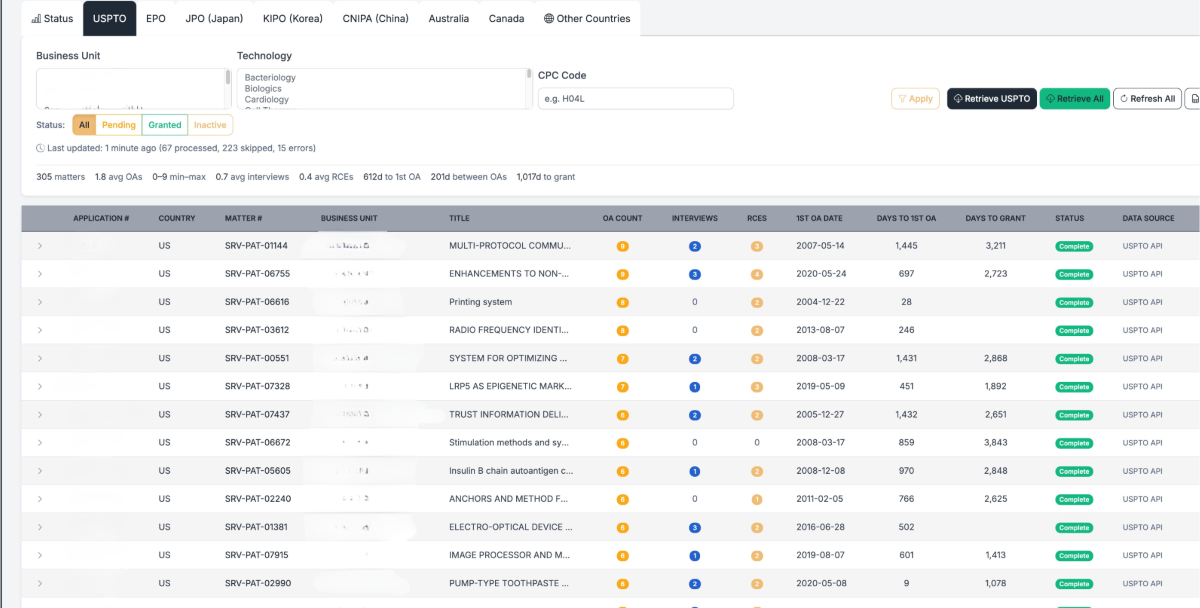
The Office Actions screen organizes prosecution data by patent office. Tabs across the top let you switch between USPTO, EPO, JPO (Japan), KIPO (Korea), CNIPA (China), Australia, Canada, and Other Countries.
You can filter by Business Unit, Technology, CPC Code, and Status (All, Pending, Granted, or Inactive) to narrow down exactly what you’re looking at. At the top, summary stats give you a quick overview of your portfolio: total matters, average number of office actions, average interviews, average RCEs, average days to first office action, average days between office actions, and average days to grant.
Each row shows the application number, country, matter number, business unit, title, OA count, interviews, RCEs, first OA date, days to first OA, days to grant, status, and data source. For example, you can see that a US patent had 9 office actions, 2 interviews, 3 RCEs, and took 3,211 days to grant, with all data pulled directly from the USPTO API.
You can retrieve data on demand using the Retrieve USPTO button for individual matters, Retrieve All to pull everything at once, or Refresh All to update your existing records.
Have feedback or enhancement ideas? Email us at support@prokurio.com
Like this kind of stuff?
We release product updates every weekend!
Check out all our 2026 updates here: 2026 Updates
Want to learn more about our IP cost planning tools?
Learn more here: Prokurio Cost Estimation Tools
Want to learn more about our IP budget planning tools?
Learn more here: IP budgeting tools