
A Faster Way to Manage Fee Schedules
Keeping your foreign associate fee schedules up to date used to mean a lot of manual work. Now you can upload them directly into Prokurio and have them processed automatically. Let’s dive in.
What Is It?
The Fee Schedule Upload tool lets you take a fee schedule from your foreign associate, upload it into Prokurio, and have it processed and loaded into the system automatically. No more manual entry of fees line by line or working from spreadsheets scattered across your organization.
Drag, Drop, Done
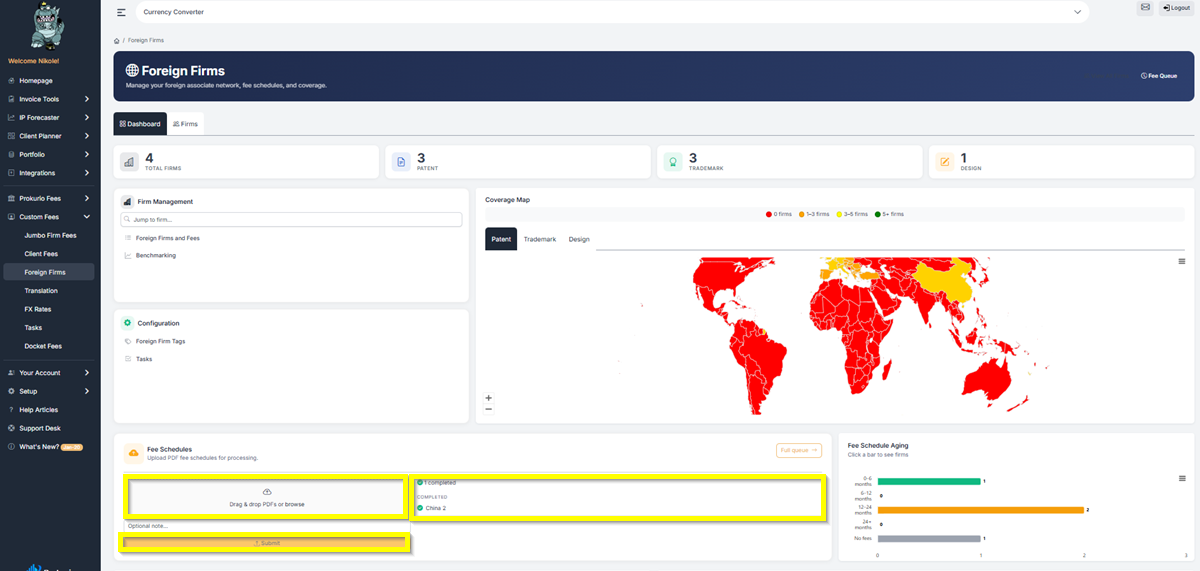
You can access the upload tool directly from the Foreign Firms Dashboard under Custom Fees > Foreign Firms. In the Fee Schedules section, just drag and drop your PDF fee schedules or click browse to select files. Add an optional note if desired and click Submit. The system takes it from there.
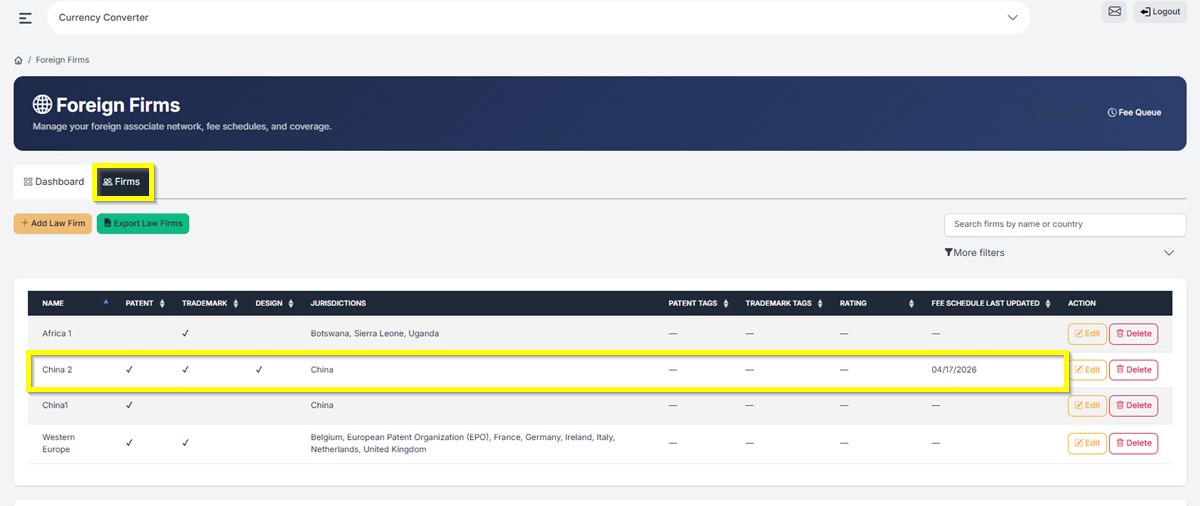
You can check the Full Queue to see any schedules currently being processed. Once a schedule is done, it shows as Completed with the firm name right next to it, so you always know what’s been uploaded and for which firm. The fees are then loaded into the system and ready to be used in your forecasts and invoice reviews.
Keep Every Year on File
One of the biggest improvements is the ability to store multiple fee schedules per year for each firm. Prior to this update, you could only have one per firm. Now you can upload a fee schedule for 2025, another for 2026, and keep them all organized in one place.
This means your team always knows where to find the latest version. Every year when your firm sends updated schedules, they go straight into Prokurio. No more hunting through emails, shared drives, or asking around the office for the most recent file.
Spot Outdated Schedules
The Fee Schedule Aging chart on the Foreign Firms Dashboard shows you how current your fee schedules are at a glance. It breaks them down by age range: 0 to 6 months, 6 to 12 months, 12 to 24 months, and 24+ months. Click on any bar to see which firms fall into that range. If you see a lot of schedules in the 24+ months category, it’s probably time to request updated ones from those firms.
How It All Connects
The Fee Schedule Upload tool works hand in hand with the rest of the Foreign Firms Dashboard. Your uploaded fee schedules feed directly into your forecasts and benchmarking, so the more current your schedules are, the more accurate your cost estimates will be.
Have feedback or enhancement ideas? Email us at support@prokurio.com
Like this kind of stuff?
We release product updates every weekend!
Check out all our 2026 updates here: 2026 Updates
Want to learn more about our IP cost planning tools?
Learn more here: Prokurio Cost Estimation Tools
Want to learn more about our IP budget planning tools?
Learn more here: IP budgeting tools