
Explore the New Foreign Firms Dashboard
What used to take multiple steps across menus and spreadsheets is now simplified. The new Foreign Firms dashboard brings fee management into a single, clear view. Let’s take a look.
What's New?
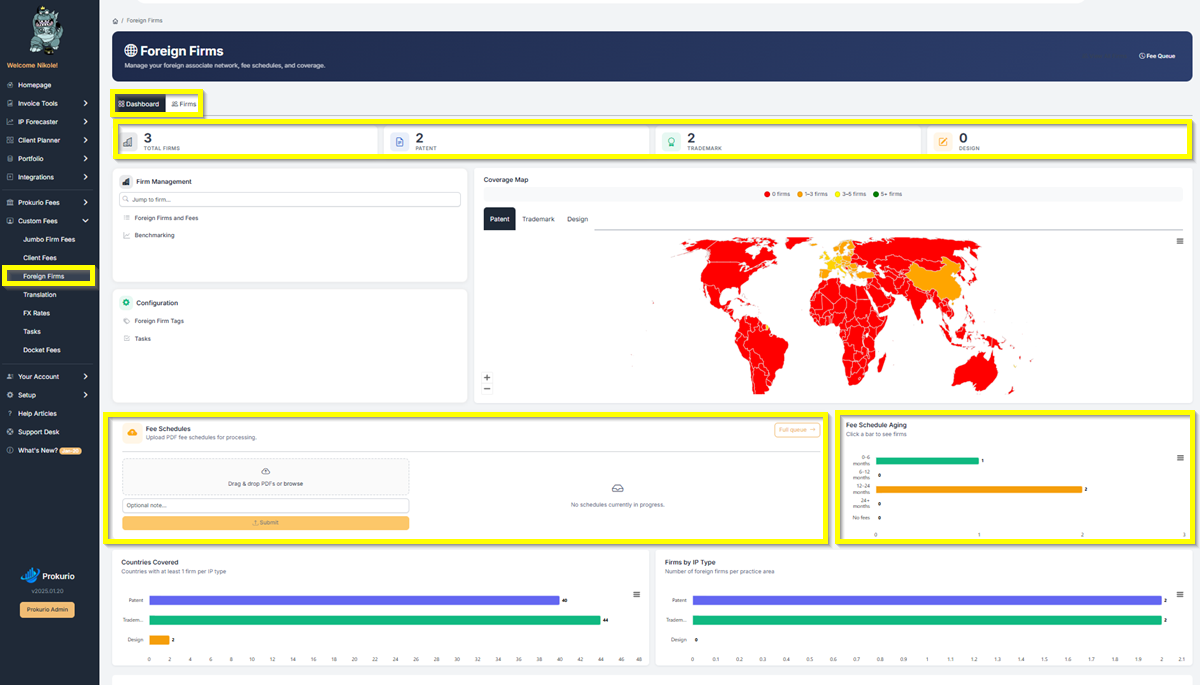
When you go to Custom Fees > Foreign Firms, you’ll now land on a Dashboard tab instead of the old firm list. Right at the top, summary cards show your Total Firms, Patent firms, Trademark firms, and Design firms, giving you an instant snapshot of your foreign associate network.
Coverage Map
The dashboard features an interactive Coverage Map that shows where your foreign firms are located around the world. Countries are color-coded based on how many firms you have in each region, from red (0 firms) to green (5+ firms). You can toggle between Patent, Trademark, and Design tabs to see coverage by IP type.
Firm Management and Configuration
On the left side, the Firm Management panel gives you quick access to Foreign Firms and Fees and Benchmarking. The Jump to Firm search bar lets you navigate to any specific firm instantly without scrolling through a long list.
Below that, the Configuration panel provides shortcuts to Foreign Firm Tags and Tasks for keeping your firm data organized.
Fee Schedules
The Fee Schedules section lets you upload fee schedules directly from the dashboard. Just drag and drop your PDFs or browse for files, add an optional note, and click Submit. The system processes and loads them automatically. You can also check the Full Queue to see any schedules currently in progress.
Next to it, the Fee Schedule Aging chart shows how current your fee schedules are, broken down by age range: 0 to 6 months, 6 to 12 months, 12 to 24 months, and 24+ months. Click on any bar to see which firms fall into that range. This makes it easy to spot which schedules need updating.
Countries Covered and Firms by IP Type
Countries Covered shows how many countries have at least one firm per IP type, broken out by Patent, Trademark, and Design.
Firms by IP Type shows the number of foreign firms per practice area. Together, these give you a clear picture of where your coverage is strong and where there might be gaps.
The Firm List Isn’t Going Anywhere
The new dashboard sits as the first tab, giving you more insight right away. Your trusted firm list is still in the Firms tab, exactly as before.
Have feedback or enhancement ideas? Email us at support@prokurio.com
Like this kind of stuff?
We release product updates every weekend!
Check out all our 2026 updates here: 2026 Updates
Want to learn more about our IP cost planning tools?
Learn more here: Prokurio Cost Estimation Tools
Want to learn more about our IP budget planning tools?
Learn more here: IP budgeting tools