
Making Pruning Decisions: From Candidates to Committed Savings
You’ve set up your pruning policies and identified your candidates. Now what? Pruning decisions is where your team takes action. Let’s check it out!
What Are Pruning Decisions?
Once your pruning policies have flagged candidates for review, the next step is evaluating those patents and making actual decisions. The pruning decisions screen is where your team reviews flagged patents, sees the financial impact, and commits to savings targets.
How It Works?
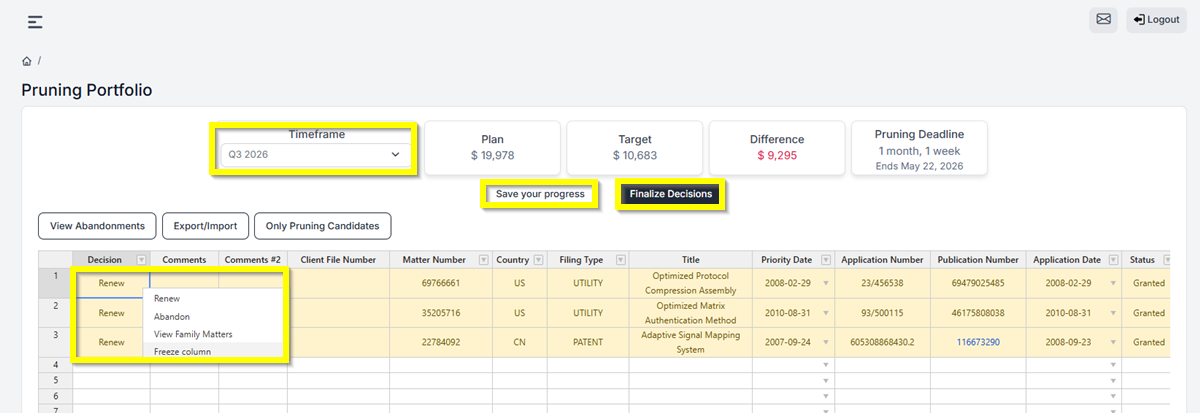
Once you save your pruning policies, head to Financial Planning > Pruning Portfolio and select your Timeframe (for example, Q3 2026). The system gives you a clear snapshot of where things stand:
- Plan shows your projected maintenance cost for that period if you keep everything.
- Target is your savings goal after applying your pruning policies.
- Difference shows the gap between the two, so you know exactly how much you still need to commit.
- Pruning Deadline tells your team how much time is left to finalize their decisions.
Making Your Decisions
Under the Decision column, you can select to Renew or Abandon each flagged patent. Your team can also add comments to document their reasoning, keeping everything in one place instead of scattered across emails and spreadsheets.
As your team works through the list it will autosave for them. Additionally, they can click Save Your Progress to keep their decisions. Once all decisions are completed and the target is acheived, click Finalize Decisions to lock everything in before the pruning deadline.
You can also use View Abandonments to see only the patents marked for abandonment, Export/Import to work with the data offline, or Show All to see the full list.
Have feedback or enhancement ideas? Email us at support@prokurio.com
Like this kind of stuff?
We release product updates every weekend!
Check out all our 2026 updates here: 2026 Updates
Want to learn more about our IP cost planning tools?
Learn more here: Prokurio Cost Estimation Tools
Want to learn more about our IP budget planning tools?
Learn more here: IP budgeting tools