Monitor Your Pruning Process From One Dashboard
Your pruning policies are in place, and your team is actively making decisions. But how do you stay on top of everything across all your IP managers? That’s where the IP Operations Dashboard comes in. Let’s take a look.
What Is the IP Operations Dashboard?
The IP Operations Dashboard brings the entire pruning workflow together in one place. Your team defines the policies, your IP managers review and commit their decisions in the Pruning Portfolio, and the operations team oversees the full process from this dashboard to make sure savings targets are met before the deadline.
Deadline Countdown and Quick Actions
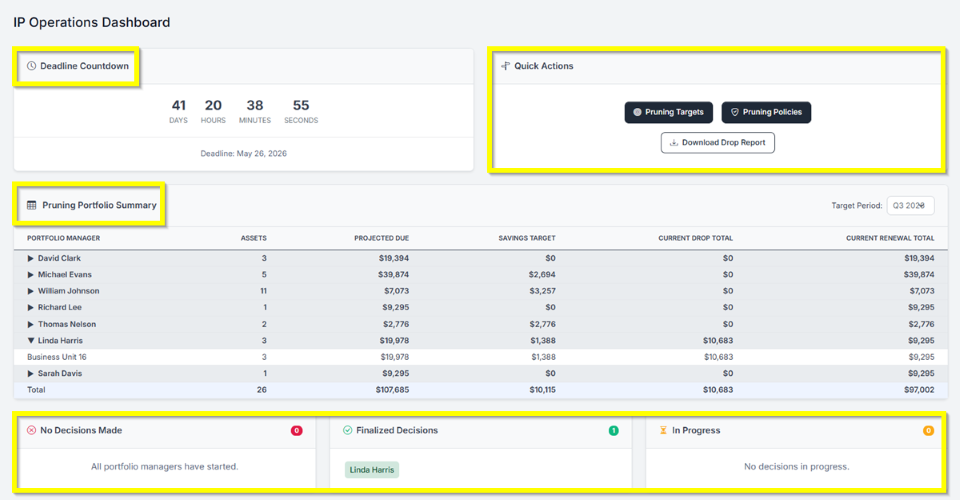
At the top, a live Deadline Countdown shows exactly how much time is left before your pruning deadline, keeping everyone aligned without anyone having to ask. Next to it, Quick Actions lets you jump straight to Pruning Targets, Pruning Policies, or Download Drop Report for a quick export of all patents marked for abandonment.
Pruning Portfolio Summary
This is where you get the full picture. The summary breaks down pruning progress by portfolio manager for any target period, showing their number of assets, projected dues, savings target, current drop total, and current renewal total. The totals row at the bottom gives you the overall picture across all managers at a glance.
Tracking Decision Status
Three status cards at the bottom show where every portfolio manager stands: No Decisions Made, Finalized Decisions, and In Progress. This makes it easy to see who needs a nudge and who’s already done without checking in with each person individually.
Have feedback or enhancement ideas? Email us at support@prokurio.com
Like this kind of stuff?
We release product updates every weekend!
Check out all our 2026 updates here: 2026 Updates
Want to learn more about our IP cost planning tools?
Learn more here: Prokurio Cost Estimation Tools
Want to learn more about our IP budget planning tools?
Learn more here: IP budgeting tools