
Prokurio’s Foreign Firm Dashboard makes it easy to see how your foreign associate fees compare to market benchmarks, so you always know where you stand.
Let’s compare foreign associate fees for a given country and filing phase.
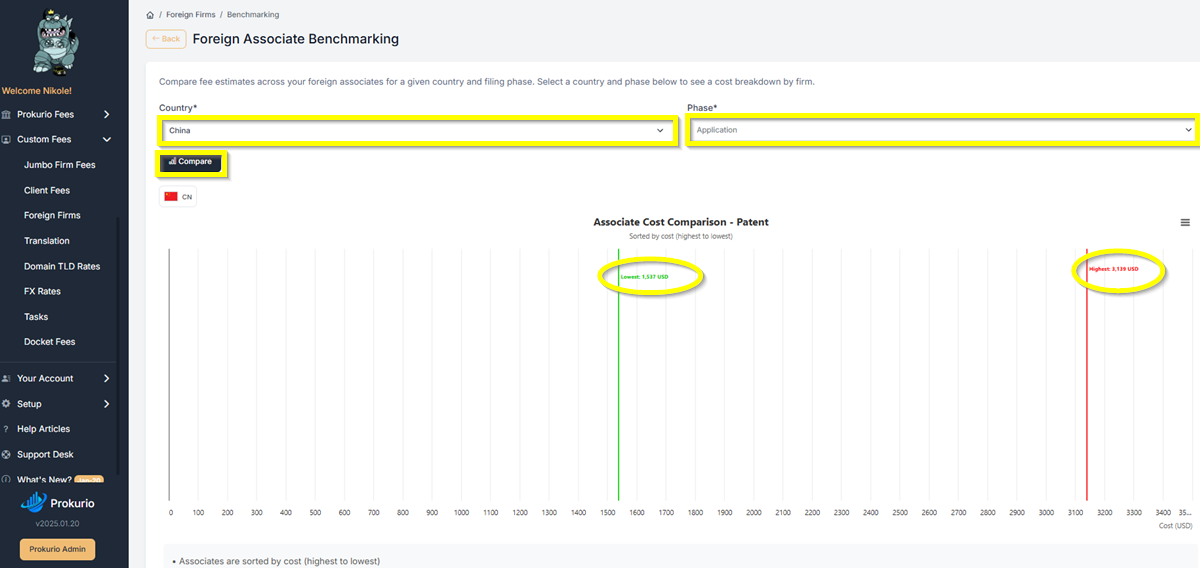
- From your Homepage, navigate to Custom Fees > Foreign Firms. Then select Benchmarking. This will take you to the Foreign Associate Benchmarking
- Select a Country from the dropdown (e.g., China).
- Select a Phase (e.g., Application, Examination, or Maintenance).
- Click Compare. The system generates an Associate Cost Comparison — Patent chart, sorted by cost from highest to lowest. A green line marks the lowest market rate so you can instantly see where your firms fall within the range.
- To export the results, click the menu icon in the top-right corner of the chart. The following options are available:
- View in full screen
- Print chart
- Download PNG image
- Download JPEG image
- Download SVG vector image
- Download CSV
- Download XLS
- View data table
- Download PDF document
If you need any additional assistance, please contact us at support@prokurio.com, and we’ll get you the answers you need!

