Forecasting PCT Application Costs with Direct National Filings

IP Forecaster makes it simple to create PCT application forecasts and add direct national filings in a single forecast. These forecasts can be Saved, Emailed, and/or Exported for later use or distribution to team members or clients to review.


  • From your Homepage, at the top under Create a New Forecast, click the button labeled Patent. Then select PCT Applications + Direct National. This will take you directly to the PCT Forecast screen.
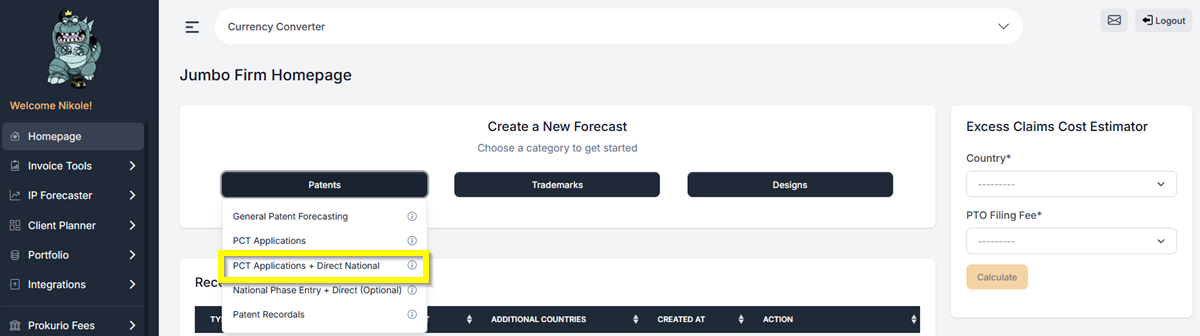
PCT ND Application

  • Under the PCT Application details, select the countries that will act as the Receiving Office and as the International Search Authority (ISA).
  • Enter the number of pages needed.
  • Then, under the Direct National Application details, add the countries you want to be included in the filing.
  • For this example, let us add Japan and Australia as the Direct national Countries. Then we will select the “United States” as both the Receiving Office and the Search Authority.
  • Let’s also apply 5 Total claims and 3 independent claims.
  • Under Fee Filters, select the Phases and Fee Sources you want to include in the Forecast.  Just click the toggle on/off button to turn off fees that may not be relevant to your forecast or that you don’t want to include.
  • Then click Create Forecast to generate your forecast.
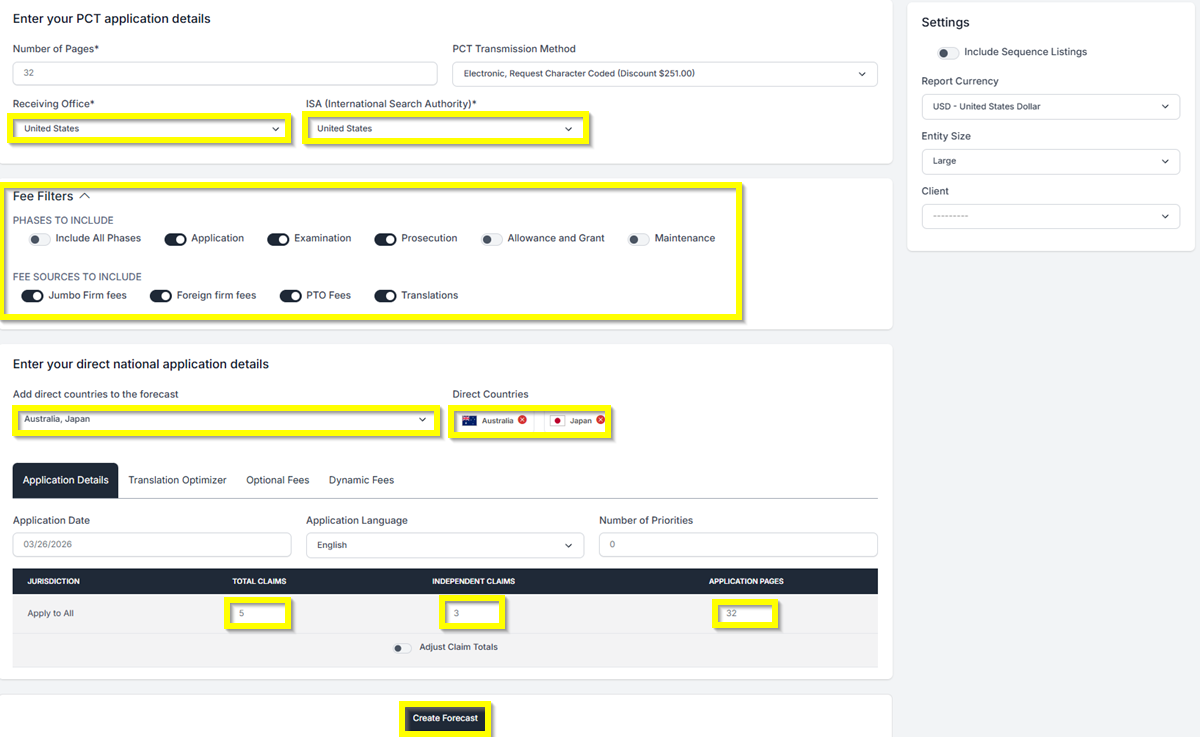
PCT and Direct Fee Filter

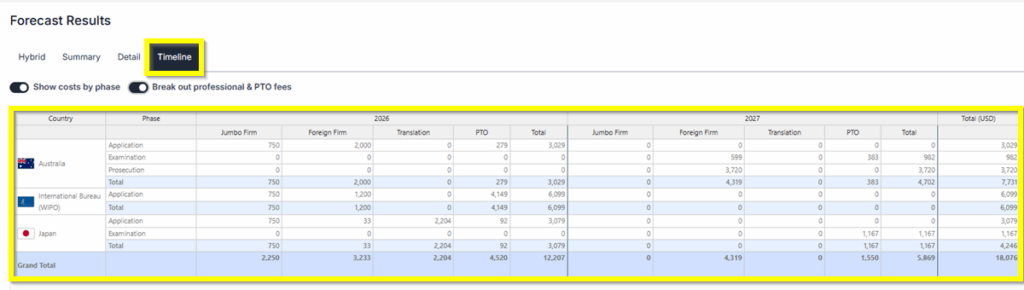
  • Forecast Results: You will have 3 different views of the results: Hybrid, Summary, and Detailed Timeline.
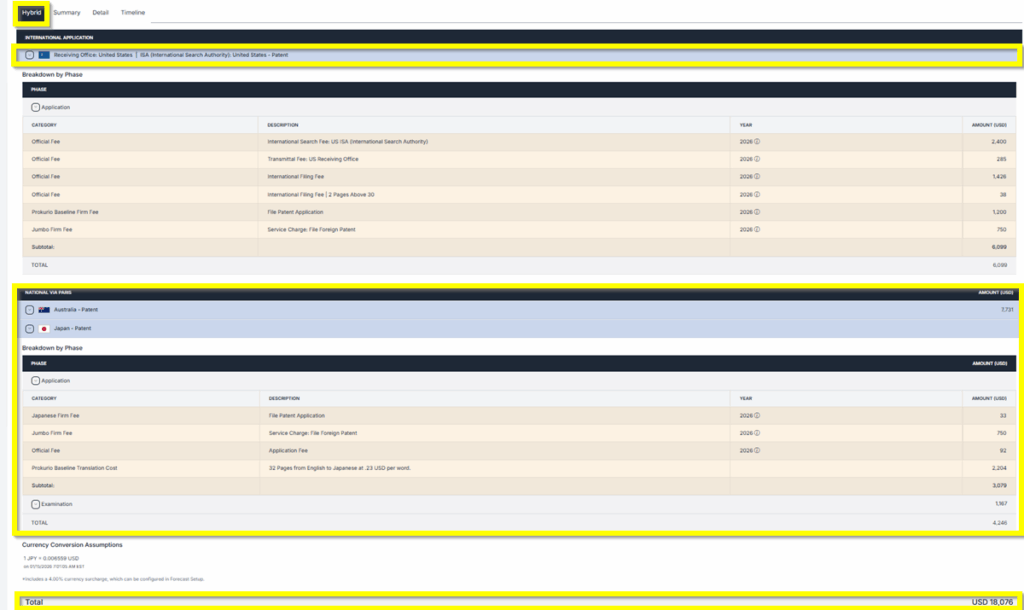
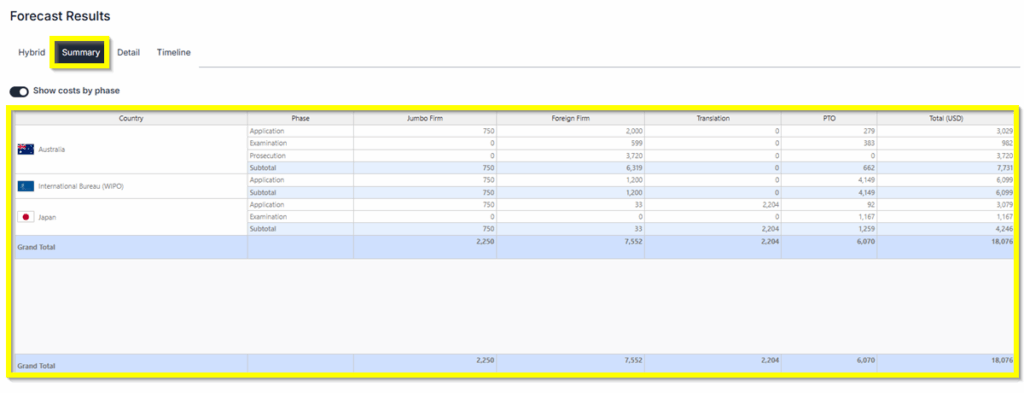
PCT National Hybrid PCT National Summary PCT National Timeline  

  • Saving and Sharing (bottom left) allows you to SaveEdit, ExportCreate New, or Send by Email your forecast results.

EditSaveShare  

If you need any additional assistance, please contact us at support@prokurio.com, and we’ll get you the answers you need!

How's our content?
Full logo

We've Got a Lot To Share!

Sign up for quick IP-focused updates every once in a while. 
small c popup

Let's Do It!

Give us your email if you’d like to try out IP Forecaster. We’ll shoot you a confirmation email and get you set up quickly – check your SPAM folder if you don’t see an email within 10 minutes.

There’s no cost or long-term obligation.
small c popup

Let's Do It!

Give us your email if you’d like to try out our Firm Planning Bundle. We’ll send you a confirmation email and get your trial started. If you don’t see an email within 10 minutes, check your spam folder.

There’s no cost or long-term obligation.
small c popup

Let's Do It!

Give us your email if you’d like to try out Client Planner. We’ll shoot you a confirmation email and get your trial started – check your SPAM folder if you don’t see an email within 10 minutes.

There’s no cost or long-term obligation.
Full logo

We need a little info...

Give us some contact info and we’ll email you the program details. No SPAM, no hassles. 
Full logo

You're All Set!

You should receive a confirmation shortly.
Check your SPAM folder if you don’t see an email.
small c popup

Let's Do It!

Give us your email if you’d like to try out IP Forecaster. We’ll shoot you a confirmation email and get you setup quickly – check your SPAM folder if you don’t see an email within 10 minutes.

There’s no cost or long-term obligation.