How to Add Multiple Currencies to Your Fee Schedule

Prokurio’s Multi-Currency Pricing Schedules allow you to add multiple currencies and amount combinations to a single fee entry. Set your default currency once in Law Firm Setup, and the system will automatically match the right fee to each forecast based on the forecast currency.


Let’s enable multi-currency fees and set your firm’s default currency.

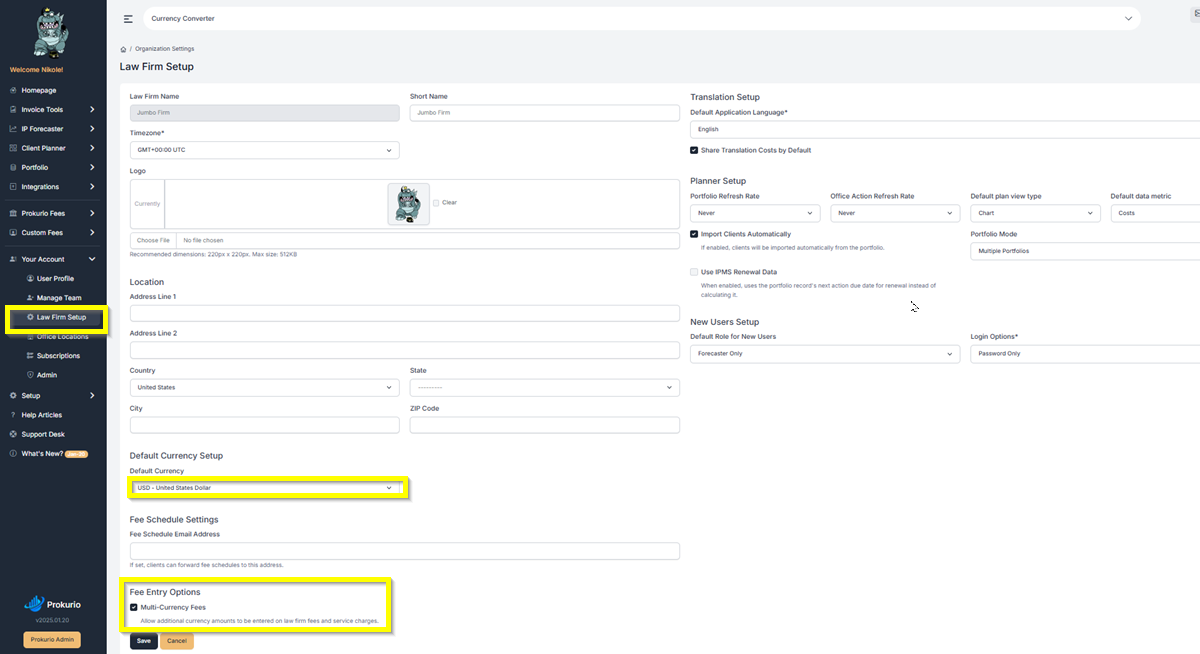
  • From your Homepage, go to Your Account, then select Law Firm Setup.
  • Under Default Currency Setup, set your firm’s default currency (e.g., USD, GBP, EUR). This determines which currency is used as the baseline across your fee schedules and forecasts.
  • Under Fee Entry Options, check the Multi-Currency Fees box. Click Save when done.
 

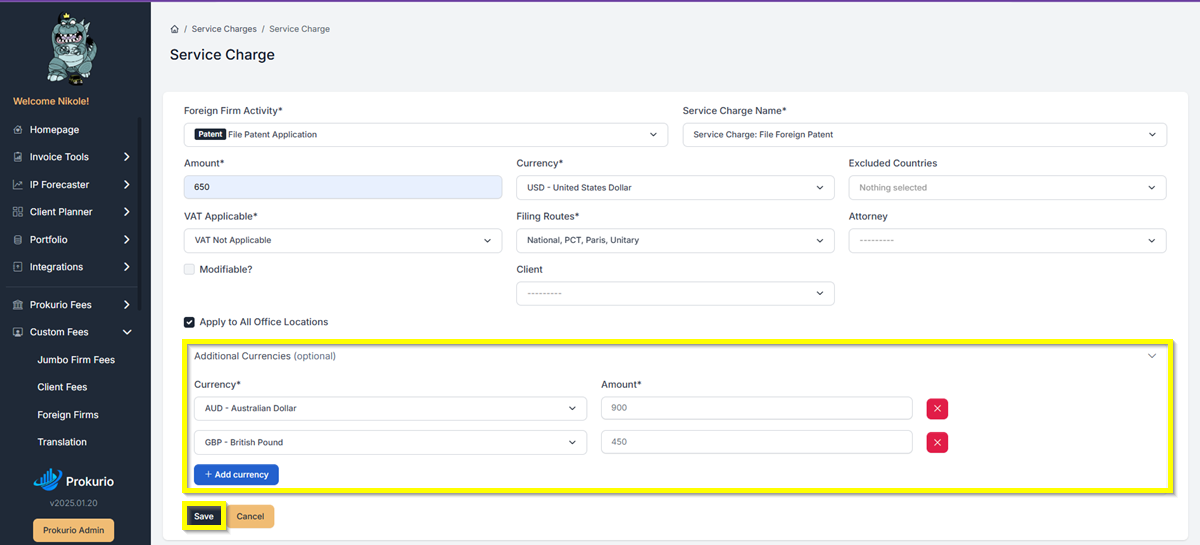
  • Once enabled, open or create an organization fee or service charge.
  • Set the amount for your default currency.
  • Click Add Currency to include additional currency and amount combinations — all within the same fee entry. Repeat for each currency you need (e.g., USD, EUR, GBP).
  • Click Save when done.
    Service Charge form with an 'Additional Currencies' section showing AUD 900 and GBP 450, plus a blue 'Add currency' button and a highlighted Save button in the footer area.

If you need any additional assistance, please contact us at support@prokurio.com, and we’ll get you the answers you need!

How's our content?
Full logo

We've Got a Lot To Share!

Sign up for quick IP-focused updates every once in a while. 
small c popup

Let's Do It!

Give us your email if you’d like to try out IP Forecaster. We’ll shoot you a confirmation email and get you set up quickly – check your SPAM folder if you don’t see an email within 10 minutes.

There’s no cost or long-term obligation.
small c popup

Let's Do It!

Give us your email if you’d like to try out our Firm Planning Bundle. We’ll send you a confirmation email and get your trial started. If you don’t see an email within 10 minutes, check your spam folder.

There’s no cost or long-term obligation.
small c popup

Let's Do It!

Give us your email if you’d like to try out Client Planner. We’ll shoot you a confirmation email and get your trial started – check your SPAM folder if you don’t see an email within 10 minutes.

There’s no cost or long-term obligation.
Full logo

We need a little info...

Give us some contact info and we’ll email you the program details. No SPAM, no hassles. 
Full logo

You're All Set!

You should receive a confirmation shortly.
Check your SPAM folder if you don’t see an email.
small c popup

Let's Do It!

Give us your email if you’d like to try out IP Forecaster. We’ll shoot you a confirmation email and get you setup quickly – check your SPAM folder if you don’t see an email within 10 minutes.

There’s no cost or long-term obligation.