
The Fee Schedule Manager lets you take a PDF fee schedule from a foreign associate and upload it directly into Prokurio. The system processes it automatically and loads it into your forecasts and invoice reviews, no more manual line-by-line entry or chasing down spreadsheets.
Uploading a fee schedule
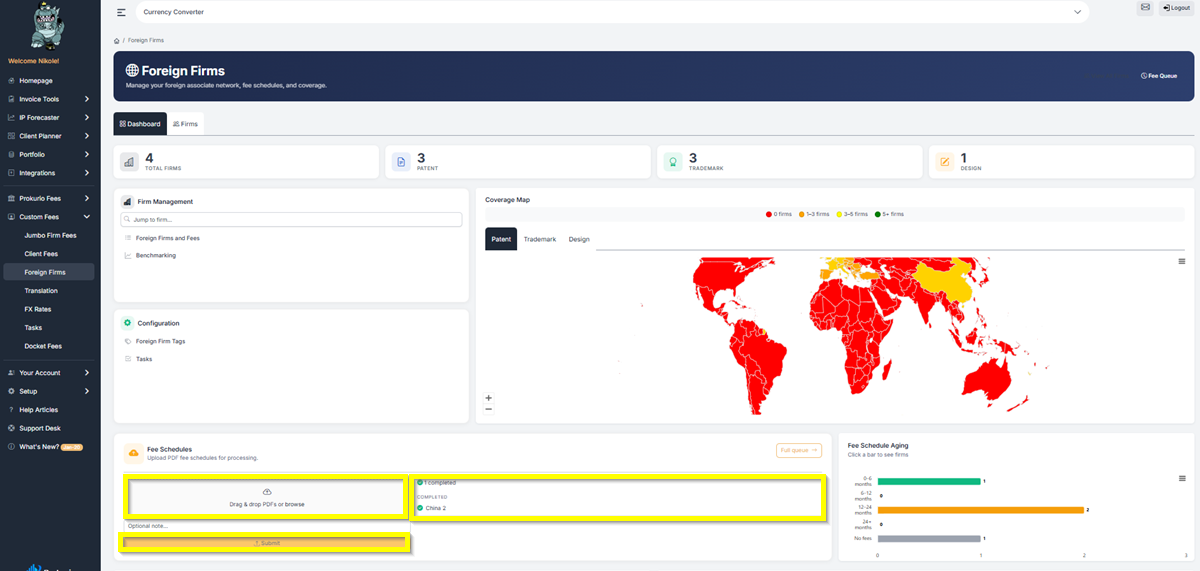
- From your Homepage, under Custom Fees, click Foreign Firms, then scroll down to the Fee Schedules section.
- Drag and drop your PDF fee schedule onto the upload area, or click Browse to select the file from your computer.
- Add an optional note to record which year or version the schedule is for.
Checking processing status
After submitting, open the Full Queue to monitor progress. Each item shows the firm name and current status. Once a schedule shows as Completed, the fees are live in your forecasts and invoice reviews.
Storing multiple schedules per firm
You can now store more than one fee schedule per firm, for example, a 2025 schedule and a 2026 schedule for the same foreign associate, all in one place. When a firm sends updated schedules each year, upload the new file, and it will be added to the existing records. Previous schedules remain on file.
Fee schedule aging chart
The Fee Schedule Aging chart on the Foreign Firms Dashboard shows how current your schedules are across all firms, broken into four age ranges:
- 0–6 months — current
- 6–12 months — worth reviewing
- 12–24 months — getting outdated
- 24+ months — request an updated schedule from the firm
How it connects to your forecasts
Uploaded fee schedules feed directly into your cost forecasts and invoice benchmarking. Keeping your schedules current is the most reliable way to ensure your estimates reflect what your foreign associates are actually charging.
If you need any additional assistance, please contact us at support@prokurio.com, and we’ll get you the answers you need!

