How to Set Word Expansion Factors for Foreign Firms

Word Expansion Factors let you set a multiplier for each language pair. If the translated text contains more words than the source, Prokurio uses the factor to estimate translation costs. Language pairs without a factor use the default value of 1.00.


Let’s add a Word Expansion Factor to a foreign firm.

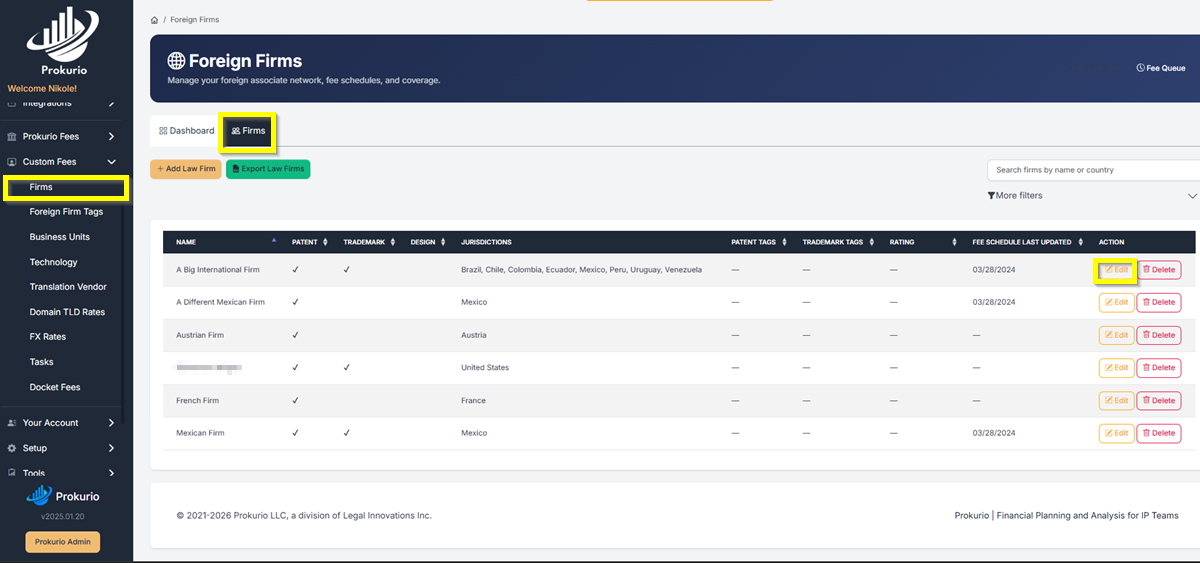
  • From your Homepage, go to Custom Fees in the left sidebar, then select Firms.
  • On the Firms tab, find the firm you want to configure and click Edit.
Firm Sync1

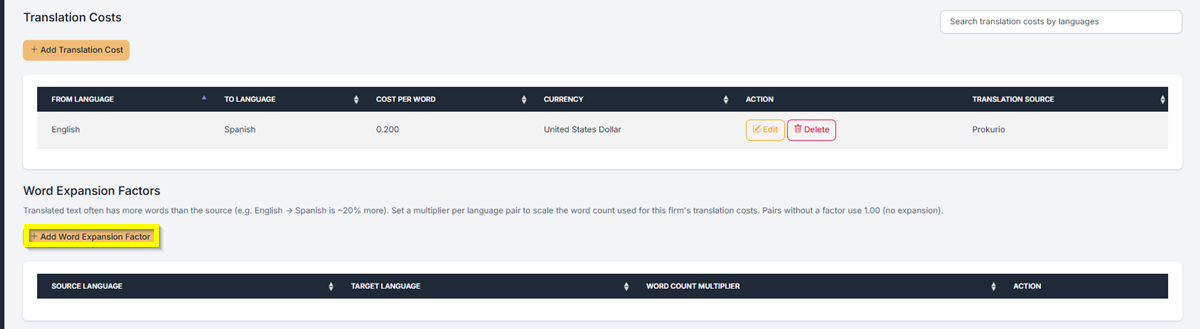
  • On the firm’s maintenance screen, scroll down to the Word Expansion Factors section and click + Add Word Expansion Factor.
Firm Sync 2

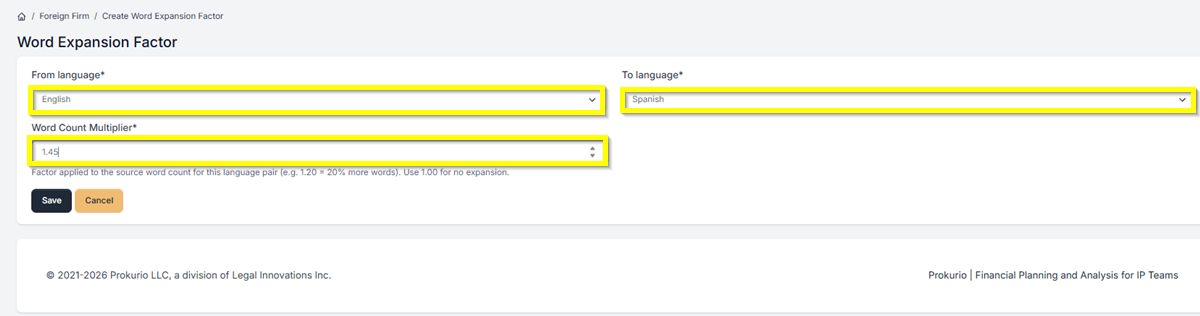
  • Set your From language and To language using the dropdowns.
  • Enter your Word Count Multiplier. For example, 1.20 = 20% more words. Use 1.00 for no expansion.
  • Click Save.

Firm Sync 3

Note: Each language pair needs its own entry. Pairs without a factor set will use 1.00 (no expansion) by default.


If you need any additional assistance, please contact us at support@prokurio.com, and we’ll get you the answers you need!


How's our content?
Full logo

We've Got a Lot To Share!

Sign up for quick IP-focused updates every once in a while. 
small c popup

Let's Do It!

Give us your email if you’d like to try out IP Forecaster. We’ll shoot you a confirmation email and get you set up quickly – check your SPAM folder if you don’t see an email within 10 minutes.

There’s no cost or long-term obligation.
small c popup

Let's Do It!

Give us your email if you’d like to try out our Firm Planning Bundle. We’ll send you a confirmation email and get your trial started. If you don’t see an email within 10 minutes, check your spam folder.

There’s no cost or long-term obligation.
small c popup

Let's Do It!

Give us your email if you’d like to try out Client Planner. We’ll shoot you a confirmation email and get your trial started – check your SPAM folder if you don’t see an email within 10 minutes.

There’s no cost or long-term obligation.
Full logo

We need a little info...

Give us some contact info and we’ll email you the program details. No SPAM, no hassles. 
Full logo

You're All Set!

You should receive a confirmation shortly.
Check your SPAM folder if you don’t see an email.
small c popup

Let's Do It!

Give us your email if you’d like to try out IP Forecaster. We’ll shoot you a confirmation email and get you setup quickly – check your SPAM folder if you don’t see an email within 10 minutes.

There’s no cost or long-term obligation.